How to Set Up a Starboard in Discord

A starboard is a channel that collects your server's best messages. When a message gets enough of a chosen emoji reaction (usually ⭐), a bot reposts it to the starboard channel with a link back to the original. To set one up, create a #starboard channel, then in the Appy dashboard go to Starboard, create a starboard, pick the channel, the emoji and how many reactions it takes.
Why have a starboard?
- It's a "best of" for your server. New members can scroll it to get a feel for the community.
- Members decide what's good, not staff. Nobody has to pin things or pick favourites.
- Good posts get noticed. Great art, clips and jokes get a second life instead of scrolling away.
It works especially well in art, meme, clip-sharing and friend-group servers.
What you need first
- A
#starboardchannel. Make it read-only for members (deny Send Messages) so it only contains starred posts. Appy needs View Channel, Send Messages and Embed Links there. - Appy able to see the channels people post in, so it can count reactions.
Starboards are free.
Step 1: Create a starboard
In the dashboard, go to Starboard and click New Starboard. Give it a name and open it with the edit button.
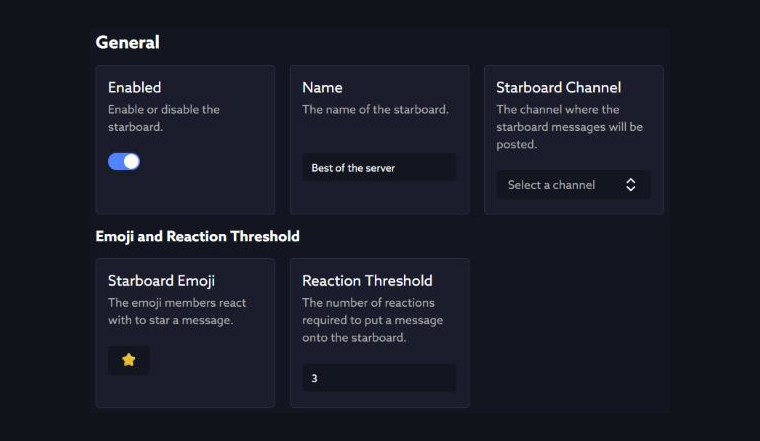
- Starboard Channel: where starred messages are reposted.
- Starboard Emoji: the reaction that counts as a star. ⭐ is the classic, but custom server emojis work too.
- Reaction Threshold: how many reactions a message needs to make it onto the starboard (up to 999).
Choosing a reaction threshold
Too low and the starboard fills with everything. Too high and nothing gets on. As a starting point:
- Small servers (under ~50 active members): 2–3
- Medium servers (50–500 active): 4–7
- Large servers (500+ active): 10 or more
Base it on active members, not total members. Then adjust after a week: if the starboard gets more than a handful of posts a day, raise it.
Step 2: Set the rules for who and what can be starred
Under Restrictions and Whitelists:
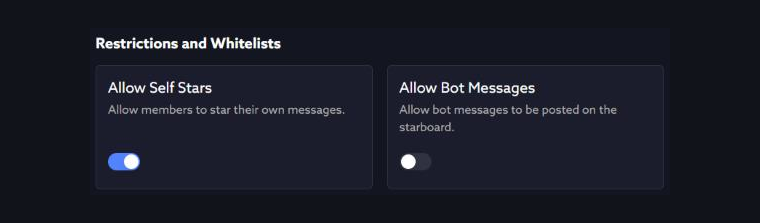
- Allow Self Stars: whether someone's reaction on their own message counts. On by default. Turn it off if people star themselves to game the board.
- Allow Bot Messages: whether bot posts can be starred. Usually leave this off.
- Restricted Roles: members with these roles can't star messages, e.g.
Muted. - Whitelisted Roles: only members with these roles can star. Leave empty to let everyone star.
- Restricted Channels: messages in these channels never go on the starboard, e.g.
#staff,#ventor your rules channel. - Whitelisted Channels: only messages in these channels can be starred. Leave empty for all channels.
Click Save.
How the starboard updates
- When a message reaches the threshold, Appy posts it to the starboard with its content, attachments and star count.
- The star count on the starboard post updates as more people react.
- If reactions drop back below the threshold, for example people remove their stars, Appy removes the post from the starboard.
Running more than one starboard
You can create several starboards, each with its own channel, emoji and threshold. For example:
#art-hall-of-fame, whitelisted to#art, using 🎨 with a threshold of 5.#best-memes, whitelisted to#memes, using 😂 with a threshold of 8.
Troubleshooting
Messages aren't appearing on the starboard. Check the reaction threshold isn't too high, the source channel isn't restricted, and Appy can see the source channel and post in the starboard channel.
The wrong emoji is counting. Only the emoji set in Starboard Emoji counts. Make sure members are reacting with that exact emoji.
Private channels are showing up on the starboard. Add them to Restricted Channels so their messages never leave the channel.
FAQ
Is the Appy starboard free? Yes.
Can people star their own messages? By default, yes. Turn off Allow Self Stars to stop it.
Does a post get removed if it loses stars? Yes. If it drops below the threshold, it's removed from the starboard.
Can I use a custom emoji? Yes, any emoji from your server works.
