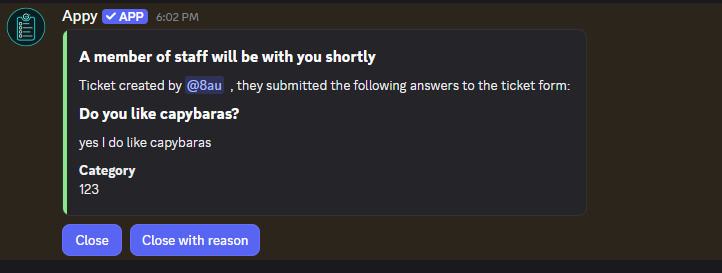
Ticket panels members can use in one click
Post a panel with a button or dropdown so members can open a ticket without filling out anything complicated. Run separate panels for different things like support, reports or partnerships, and send each one to the right team.
Reusable ticket templates
Set up a template once and reuse it. Each template controls the opening message, the category tickets are created under, the channel name format, and which support roles get access. You can also add intake questions so a ticket opens with the context you need.
Control who sees each ticket
Tickets are private channels. Only the member who opened it, your support roles and server admins can see and reply, so conversations stay between the people involved.
Saved transcripts
When a ticket closes, Appy can save the full conversation as a transcript you can read back later from the dashboard. It's there for moderation and record keeping even after the channel is gone.
Free to run
The core ticketing features are free. Premium just raises the limits, so you can run more panels, more templates and add more support roles per template if you outgrow the free tier.
How to set up tickets in Discord
- Step 1Add Appy to your server
Invite Appy from the dashboard and give it permission to manage channels and roles.
- Step 2Create a ticket template
In the dashboard ticket settings, make a template that sets the opening message, the category and the support roles who can help.
- Step 3Post a ticket panel
Add a panel with a button or dropdown and send it to a channel so members can open tickets from there.
- Step 4Handle tickets
Your support team replies in the ticket channel and closes it when it's resolved. A transcript is saved on close if you've turned that on.
Frequently asked questions
Is Appy's Discord ticket bot free?
Yes. Ticket panels, templates and transcripts are free to use. Premium raises the limits on panels, templates and support roles for bigger servers.
How do I set up a ticket system in Discord?
Invite Appy, create a ticket template in the dashboard, then post a ticket panel with a button or dropdown to a channel. Members open a ticket from the panel.
Can I limit who can see and respond to tickets?
Yes. Each template has its own support roles, and only those roles, the member who opened the ticket and server admins can see and reply to it.
Does Appy save ticket transcripts?
Yes. Appy can save a transcript when a ticket is closed, so you keep a record of the conversation you can read back from the dashboard later.
Explore more Appy features
Appy is a free Discord application bot for staff applications, forms and questionnaires. Build a form with text and multiple-choice questions, post a panel members can apply from, and review submissions and assign roles without anyone leaving Discord.
Appy is a free Discord giveaway bot for running giveaways and contests in your server. Set a prize, a duration and how many winners you want, and Appy posts a giveaway members enter with a button and draws the winners when time's up.
Dealing with spam bots and throwaway accounts in your server? Appy is a free Discord verification bot that makes new members pass a captcha before they can see your channels, so bots and raiders get stopped at the entrance.

© 2023-2026 Bot Factory. All rights reserved.