Forms filled out in Discord
Members apply through their DMs with Appy. Use text questions for written answers and multiple-choice questions for set options, mark questions as required or optional, and add answer validation when you need it. No Google Forms, no links to click off to.
Automatic role actions
Add or remove roles when someone submits, gets accepted or gets denied. For example, hand out a pending role on submit and swap it for a member role on accept, so you're not editing roles by hand.
Panels and reviews inside Discord
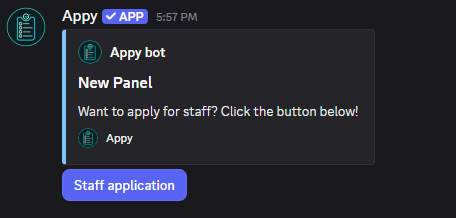
Post an application panel with a button or dropdown so members can apply from a channel. Submissions land in a channel where staff accept or deny them, with an optional reason sent back to the applicant.
Keep track of submissions
Export your submissions to CSV or JSON from the dashboard whenever you want a copy. On premium servers you can also pull up a member's past submissions while reviewing.
Customizable messages and limits
Edit the confirmation, completion, accepted and denied messages, and set entry requirements like required roles. Premium adds cooldowns, a completion time limit and answer validation.
How to set up applications in Discord
- Step 1Add Appy to your server
Invite Appy from the dashboard with permission to manage roles and channels.
- Step 2Build an application
In the dashboard, add your questions, pick text or multiple-choice for each, and set the roles to add or remove on submit, accept and deny.
- Step 3Post an application panel
Add a panel with a button or dropdown and send it to a channel so members can start applying.
- Step 4Review submissions
Accept or deny submissions from Discord, and Appy applies the role changes you set up.
Frequently asked questions
Is Appy's Discord form bot free?
Yes. You can build applications and take submissions for free. Premium raises the number of forms, questions, panels and role actions, and unlocks extras like cooldowns and answer validation.
Can applicants answer without leaving Discord?
Yes. Applicants answer the questions in their DMs with Appy, so there's no external website or Google Form to fill out.
What kinds of questions can I add?
You can add text questions for written answers and multiple-choice questions where members pick from options you set. Questions can be required or optional.
Can Appy assign roles automatically when someone applies?
Yes. You can set roles to add or remove when an application is submitted, accepted or denied, so the review handles the role changes for you.
Can I export submissions?
Yes. You can export submissions to CSV or JSON from the dashboard. Viewing a member's past submissions while reviewing is a premium feature.
Explore more Appy features
Appy is a free ticket bot for Discord and powerful ticket tool. Create Discord support tickets, customize ticket panels, save transcripts, and manage support with an easy-to-use ticket system.
Appy is a free Discord giveaway bot for running giveaways and contests in your server. Set a prize, a duration and how many winners you want, and Appy posts a giveaway members enter with a button and draws the winners when time's up.
Dealing with spam bots and throwaway accounts in your server? Appy is a free Discord verification bot that makes new members pass a captcha before they can see your channels, so bots and raiders get stopped at the entrance.

© 2023-2026 Bot Factory. All rights reserved.