How to Make a Sticky Message in Discord

Discord doesn't have sticky messages built in. Pinned messages are hidden behind the pin icon, and most members never open them. To make a sticky message, use a bot: in the Appy dashboard, go to Sticky messages, create one, pick the channel, write the message and set the Sticky speed. Whenever people chat in that channel, Appy deletes its old copy and reposts the message at the bottom, so it's always the last thing people see.
Sticky messages vs pins vs the channel topic
- Sticky message: always at the bottom of the chat. Use it for things people must see before they post: "open a ticket instead", trade formats, or the current event.
- Pinned message: a bookmark. Good for reference material people look up on purpose.
- Channel topic: the short line at the top of the channel. Fine for a one-line description, but easy to miss on mobile.
- Announcement: a one-off post. Use it for news, not standing rules.
Step 1: Create a sticky message
In the dashboard, go to Sticky messages, click New Sticky Message and give it a name (only you see this). Then open it with the edit button.
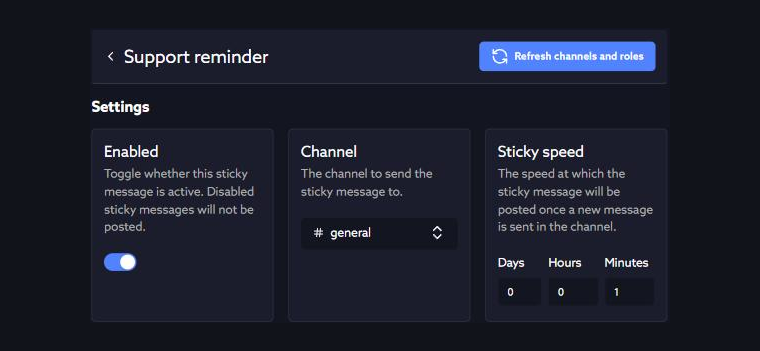
- Enabled: switch off to pause the sticky without deleting it.
- Channel: where the message sticks.
- Sticky speed: how long Appy waits before reposting again. More on this below.
Step 2: Write the message
Choose Normal message or Embed, then write it. The preview shows how it will look:

Keep it short. A sticky message is seen dozens of times a day, so two lines beat a wall of text. Click Save, and the sticky appears the next time someone sends a message in the channel.
How sticky speed works
Every time someone sends a message, Appy checks when it last reposted the sticky. If at least the sticky speed has passed, it deletes the old copy and posts a fresh one at the bottom. If not, it waits for the next message.
- The minimum is 30 seconds and the default is 1 minute. The limit stops the bot from reposting after every single message, which would spam the channel and hit Discord's rate limits.
- Busy channels: 1–2 minutes. The sticky stays near the bottom without being reposted constantly.
- Quiet channels: 30 seconds to 1 minute, so the sticky lands under almost every message.
- The maximum is 7 days, for a reminder that should only reappear occasionally.
In a very fast channel, a few messages may land below the sticky between reposts. That's expected, and it's what keeps the channel readable.
Good uses for sticky messages
#general: "Need help? Open a ticket in #open-a-ticket instead of asking here."#marketplaceor#trading: the required post format, e.g. "[H] what you have / [W] what you want / price".#self-promo: "One post per 24 hours. Links only, no DMs."#support: "Check #faq first. Include your error message and what you've tried."- Event channels: the event time and how to join, while the event is on.
Limits
Sticky messages are free. Free servers get 1 sticky message, and premium servers up to 50, enough for one in every busy channel.
Troubleshooting
The sticky never appears. It only posts after someone sends a message in the channel. Also check Appy can View Channel, Send Messages, Embed Links and Manage Messages there.
The old copy isn't deleted, so there are duplicates. Appy needs Manage Messages to delete its previous copy.
The sticky isn't always at the very bottom. The sticky speed hasn't passed since the last repost. Lower it if the channel is quiet enough.
FAQ
Does Discord have sticky messages? No. Pins are the closest built-in feature. Sticky messages need a bot.
Will a sticky message spam my channel? No. Appy deletes the old copy each time, so there's only ever one, and the sticky speed limits how often it reposts.
Can I have different sticky messages in different channels? Yes. Create a separate sticky message for each channel. Free servers get 1, and premium servers up to 50.
Can I pause a sticky message? Yes. Switch off Enabled in its settings.
Pair a sticky message with a ticket panel and members always know where to get help. See our guide to setting up a ticket system.
