How to Do a Giveaway on Discord (and Keep It Fair)

To do a giveaway on Discord, use /giveaway create or the Appy dashboard to set a prize, an end time, the number of winners and a channel. Appy posts the giveaway with an Enter Giveaway button, and when time is up it picks the winners at random and announces them. You can limit entries to certain roles, give winners a role automatically and reroll a winner who doesn't claim.
What you need first
- Appy in your server. Invite it from appy.bot.
- A channel for giveaways. A dedicated
#giveawayschannel stops the post getting buried in chat. - Appy's role above any reward role you want to give winners.
Giveaways are free on every plan, with up to 20 winners, 10 required roles and 10 reward roles per giveaway.
Option 1: Create a giveaway from the dashboard
Go to Giveaways in your server's dashboard and click New Giveaway.
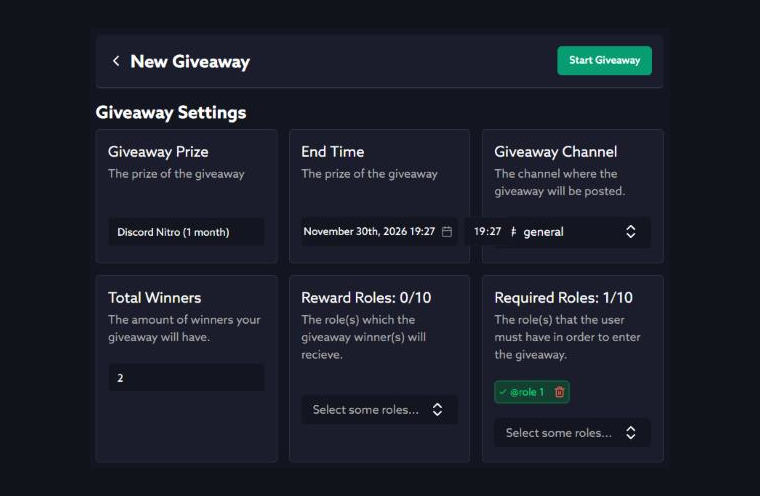
- Giveaway Prize: be specific. "Discord Nitro (1 month)" gets more entries than "Nitro".
- End Time: pick a date and time. 2–7 days gives people who aren't online every day a fair chance.
- Giveaway Channel: where the giveaway is posted.
- Total Winners: up to 20.
- Reward Roles: roles given to the winners automatically, e.g.
Giveaway Winner. - Required Roles: members must have these to enter. More on this below.
- Limit entries: cap the number of entrants, or leave it on Unlimited.
Click Start Giveaway. Here's what it looks like in Discord, and what members see after they enter:
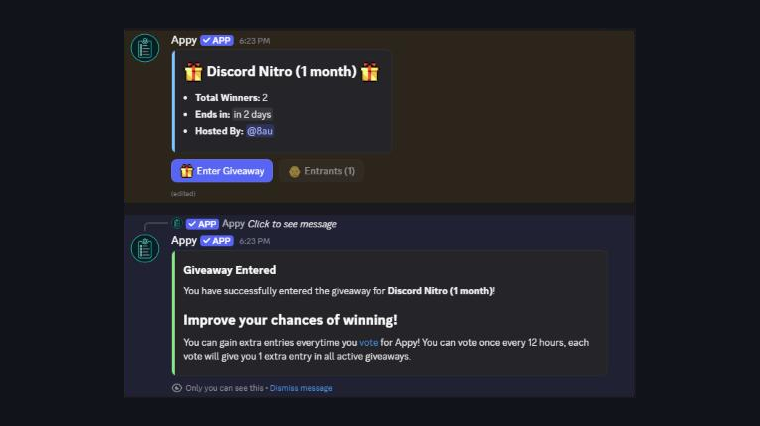
The Entrants button shows how many people have entered.
Option 2: Create a giveaway with a slash command
If you're already in Discord, /giveaway create is quicker:
prize-name: what they're winning.duration: how long it runs, e.g.30m,12hor3d.total-winners: how many winners.channel: where to post it.required-role,reward-role,descriptionandmax-entriesare optional.
Example: /giveaway create prize-name:Steam gift card duration:3d total-winners:1 channel:#giveaways required-role:@Level 10
Managing a running giveaway
Every giveaway shows up on the dashboard's Giveaways page:
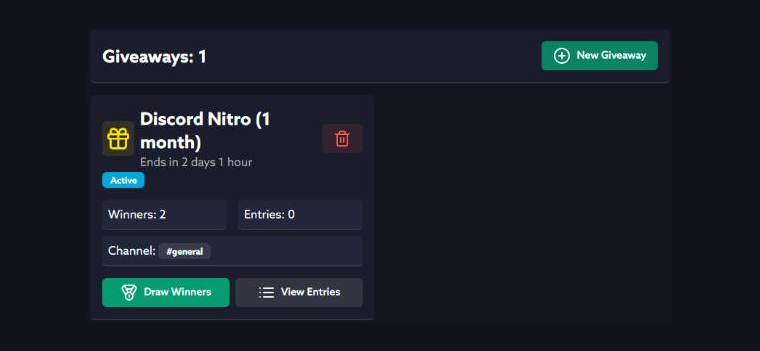
- View Entries shows who has entered.
- Draw Winners ends the giveaway early and picks winners now.
- The bin icon deletes the giveaway.
Rerolling a winner
If a winner doesn't respond, turns out to be an alt, or broke your rules, reroll them. Run /giveaway reroll, pick the ended giveaway (search by prize name or message ID) and choose which winners to replace. You can also reroll from the dashboard. Only the winners you select are replaced, so the others keep their prize.
Put the claim rules in the giveaway description so nobody's surprised: "Winners must open a ticket within 48 hours to claim, or we reroll."
How to keep giveaways fair
The most common giveaway complaint is that alts and people who joined yesterday win. A few settings fix most of that:
- Use a required role tied to activity. A
Level 5role from a levelling bot, or a role from verification, means only real, active members can enter. - Put verification in front of the server. If new members must pass a captcha to get in (see our captcha verification guide), throwaway accounts can't reach the giveaway.
- Look at the entries before you hand out the prize. View Entries takes 30 seconds, and a reroll is easier than taking a prize back.
On free servers, members who vote for Appy on top.gg get 1 extra entry in all active giveaways per vote, once every 12 hours. Mention this in your giveaway rules so nobody thinks the draw is rigged. Premium servers don't show the vote prompt.
Discord's rules for giveaways
Discord doesn't have giveaway-specific rules, but a few of its policies apply:
- Don't reward people for joining or inviting. "Invite 3 friends to enter" giveaways go against Discord's rules on incentivising server growth, and can get your server in trouble.
- Sponsored prizes may count as monetisation. If a brand is paying for your giveaway, check Discord's monetization policy first.
- Local laws still apply. Giveaways that need payment to enter can count as gambling in many places. Keep entry free.
Troubleshooting
Winners didn't get the reward role. Move Appy's role above the reward role in Server Settings → Roles.
Members say they can't enter. They're probably missing a required role. Tell them which one in the giveaway description.
The giveaway didn't end. If the giveaway message was deleted or Appy lost access to the channel, end it from the dashboard with Draw Winners.
FAQ
Is Appy's giveaway bot free? Yes. Giveaways, rerolls, required roles and reward roles are all free.
How are winners picked? At random from everyone who entered. On free servers, members who voted for Appy get extra entries.
Can I end a giveaway early? Yes. Click Draw Winners on the dashboard.
Can I reroll just one winner?
Yes. /giveaway reroll lets you choose which winners to replace.
Can I host several giveaways at once? Yes. Each one runs independently, with its own channel, end time and roles.
See everything Appy's giveaway bot can do on the Discord giveaway bot page.
