How to Automatically Give Roles to New Members on Discord

To automatically give roles to new members on Discord, open the Appy dashboard, go to Auto roles, switch on Enabled, add the role(s) you want and click Save. From then on, everyone who joins gets those roles straight away.
Discord can't do this on its own. The closest built-in option is Onboarding, which only gives roles based on answers to questions. A bot is the simple way to give everyone the same role on join.
What you need first
- The role you want to give, e.g.
MemberorNew. - Appy's role above it in Server Settings → Roles. Bots can only give roles below their own role.
Auto roles are free. Free servers can give up to 2 roles on join, and premium servers up to 5.
Step 1: Turn on auto roles
In the dashboard, go to Auto roles.
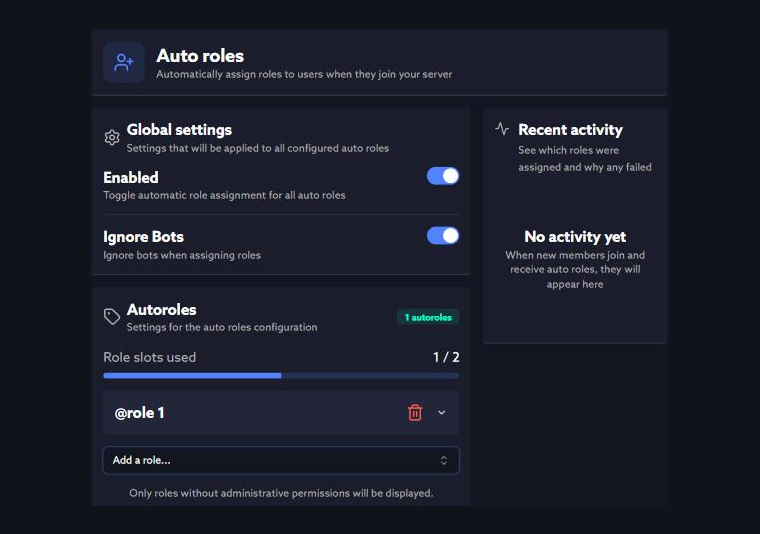
- Enabled: turns auto roles on for the whole server.
- Ignore Bots: skips bots when they're added. Leave this on, because bots usually need their own roles and permissions, not your
Memberrole.
Step 2: Add the roles
Use Add a role… to pick each role. Only roles without administrator permissions are listed, so a mistake can't hand every new member admin.
Expand a role to set an Assignment Delay in seconds (up to 86,400, or 24 hours) if you don't want it given the moment someone joins. For example, a 300-second delay gives Member 5 minutes after joining, so accounts that join and leave straight away never get it.
Click Save. The Recent activity panel shows each role Appy gives out, and the reason when one fails.
When not to use auto roles
If you use captcha verification, the auto role must not unlock the server. If Member can see all your channels and everyone gets it on join, nobody has to verify. Use the verified role for access, and keep auto roles cosmetic: a New tag, a default colour, or a notifications role.
If roles should be earned or chosen, use something else. Here's when to use what:
- Auto roles: the same role for everyone, given on join. A default
Memberrole, aNewtag, a notifications role everyone should start with. - Reaction roles: roles members pick themselves, like games, pronouns, regions and ping roles.
- Application roles: roles you give after reviewing someone, like staff, whitelist or partner.
- Verification roles: access roles, given only after a captcha.
Troubleshooting
New members aren't getting the role. Check that Appy's role is above it, that Enabled is on, and look at Recent activity for the error.
The role I want isn't in the list. It has administrator permissions. Remove Administrator from the role, or use a different role.
Existing members don't have the role. Auto roles only apply to people who join after you turn them on. Give existing members the role by hand, or let them pick it with a reaction role.
FAQ
Is it free? Yes. Free servers get 2 auto roles, and premium servers get 5.
Can bots get auto roles? Yes. Turn off Ignore Bots. It's usually better to give bots roles by hand, though.
Does it work for members who joined before I set it up? No, only for new joins.
Want members to choose their own roles instead? See our guide to reaction roles.
