Discord Polls vs Poll Bots: Which Should You Use?

For a quick vote, use Discord's built-in polls: click + next to the message box, choose Poll, add your question and answers, pick a duration and post. Use a poll bot like Appy when you need a custom end time, polls you can create and manage from a dashboard, or results you can look back on later.
Discord's built-in polls
Discord added native polls in 2024, and for most quick questions they're all you need. According to Discord's help article:
- Up to 10 answers per poll.
- Durations of 1 hour, 4 hours, 8 hours, 24 hours, 3 days or 1 week, and you can end a poll early.
- You can let people choose more than one answer.
- No anonymous voting.
To make one: open the channel, click + next to the message box, choose Poll, write the question and answers, set the duration and click Post.
When a poll bot is better
Native polls fall short in a few situations:
- You need a specific end time. "Voting closes Friday at 6pm" isn't one of Discord's fixed durations. Appy lets you pick any date and time.
- You want to create and manage polls from a dashboard. Useful when several moderators run polls, or you're preparing one ahead of an event.
- You want results afterwards. Appy keeps every poll on the dashboard with its entries and analytics, so you can check last month's results without scrolling back through chat.
- You want to end polls with a command.
/poll endwith the poll's message link closes it straight away.
If none of those apply, stick with Discord's polls. They support more answers (10 vs Appy's 5), and members already know how they work.
How to run a poll with Appy
From the dashboard
Go to Polls → New Poll:
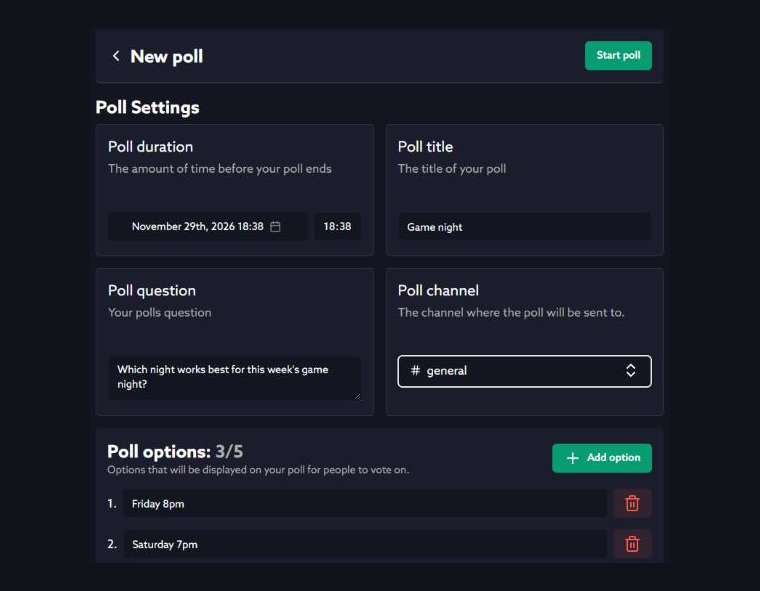
- Poll duration: the exact date and time voting closes.
- Poll title and Poll question: keep the question to one line.
- Poll channel: where the poll is posted.
- Poll options: up to 5.
Click Start poll. Members vote with the numbered buttons under the poll, and the results bars update as votes come in:

With a slash command
/poll create takes a title, a question, a channel, up to five options (poll_option_1 to poll_option_5) and allow_multiple_votes. The slash command is also where you let members pick more than one option.
Example: /poll create title:Game night question:Which night works best? channel:#events poll_option_1:Friday poll_option_2:Saturday poll_option_3:Sunday
Managing polls
Every poll appears under Polls on the dashboard:
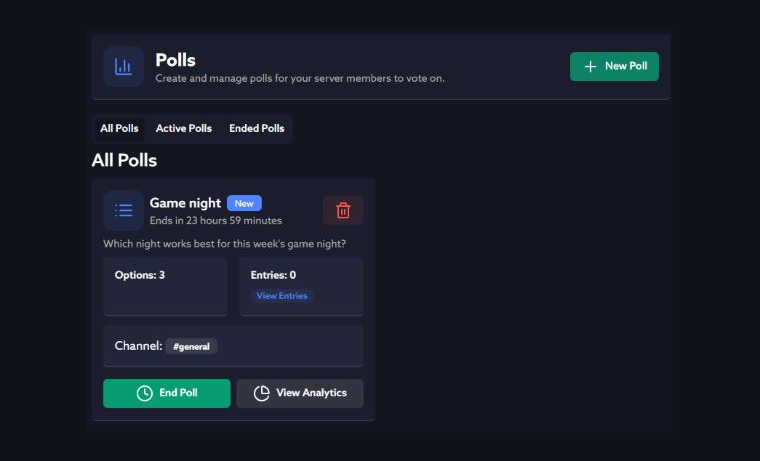
- View Entries: see who voted for what.
- End Poll: close it early.
- View Analytics: see the poll's results and activity.
- Filter between Active Polls and Ended Polls to find old results.
Poll ideas that get people talking
- Scheduling: "Which night works for game night?" Then actually run it on the winning night.
- Feature or channel votes: "Should we add a #pets channel?"
- Event choices: which game, which map, which movie.
- Community awards: best clip of the month, from nominations in a thread.
Polls work best when the result changes something. If members see you act on the outcome, they vote next time.
FAQ
Are Appy polls anonymous to other members? Members see only the totals. Server staff can see who voted using View Entries on the dashboard.
Can I edit a poll after posting? End it and create a new one, so nobody's vote counts towards a question that changed.
Can members pick more than one option?
Yes. Set allow_multiple_votes to true when you create the poll with /poll create.
Are Appy polls free? Yes.
